Turn on the data · v0.1.14 · MIT
Your database → REST API + MCP server. One command.
Faucet is a free, open-source single binary that turns PostgreSQL, MySQL, MariaDB, SQL Server, Oracle, SQLite or Snowflake into a REST API and an MCP server, so your apps and AI agents can use your data with API keys and roles built in.
npx
npx @faucetdb/faucet servebrew
brew install faucetdb/tap/faucet && faucet servedocker
docker run -p 8080:8080 -v faucet-data:/data faucetdb/faucetscript
curl -fsSL https://raw.githubusercontent.com/faucetdb/faucet/main/install.sh | shWorks with Claude, ChatGPT, Cursor, Base44, Replit and your own apps.
Supported databases
Works with the database you already have
Seven SQL engines, self-hosted, on-prem or in the cloud. Point Faucet at one (or all seven) and get a REST API and an MCP server in seconds.
-

PostgreSQL
9.6 – 17- 9.6
- 10
- 11
- 12
- 13
- 14
- 15
- 16
- 17
- Inserted rows returned (RETURNING)
- Functions & stored procedures
- Schema DDL via API
- Amazon RDS
- Aurora
- Supabase
- Neon
- Azure Database
--driver postgrespgx v5, pure Go -

MySQL
5.7 – 9.x- 5.7
- 8.0
- 8.4 LTS
- 9.x
- Stored procedures
- Schema DDL via API
- Batch inserts & updates
- Amazon RDS
- Aurora MySQL
- PlanetScale
- Azure MySQL
--driver mysqlgo-sql-driver, pure Go -

MariaDB
10.2 – 11.x- 10.2
- 10.5
- 10.6
- 10.11
- 11.4
- 11.x
- Stored procedures
- Schema DDL via API
- Batch inserts & updates
- Self-hosted
- Amazon RDS
- SkySQL
--driver mysqlServed by the MySQL driver -

SQL Server
2012 – 2022- 2012
- 2014
- 2016
- 2017
- 2019
- 2022
- Inserted rows returned (OUTPUT)
- Stored procedures
- Schema DDL via API
- Azure SQL Database
- Amazon RDS
--driver mssqlgo-mssqldb (TDS) -

Oracle
12c – 26ai- 12c
- 18c
- 19c
- 21c
- 23ai
- 26ai
- PL/SQL stored procedures
- Schema DDL via API
- Pure Go, no Instant Client
- Oracle Cloud (OCI)
- Amazon RDS
- Azure
--driver oraclego-ora, no Instant Client -

SQLite
3.35+- 3.35+ · embedded, pure Go
- Inserted rows returned (RETURNING)
- Embedded, no database server
- Schema DDL via API
- Local file
- Litestream
- Fly.io
--driver sqlitemodernc.org/sqlite, no CGO -

Snowflake
Cloud (SaaS)- Always current
- Key-pair (JWT) auth
- Stored procedures
- Warehouse reads & writes
- AWS
- Azure
- GCP
--driver snowflakegosnowflake (official)
Show CLI connect commands
PostgreSQL
faucet db add --name mydb --driver postgres \
  --host localhost --user app --password-prompt --database mydb
MySQL
faucet db add --name app --driver mysql \
  --host localhost --user app --password-prompt --database app
MariaDB
# MariaDB uses the mysql driver
faucet db add --name mariadb --driver mysql \
  --host localhost --user app --password-prompt --database app
SQL Server
faucet db add --name erp --driver mssql \
  --host localhost --user sa --password-prompt --database erp
Oracle
# --database is the Oracle service name
faucet db add --name ora --driver oracle \
  --host localhost --user app --password-prompt --database XEPDB1
SQLite
faucet db add --name local --driver sqlite --path ./data/app.dbSnowflake
faucet db add --name warehouse --driver snowflake \
  --account myorg-myaccount --user me --password-prompt \
  --database ANALYTICS --warehouse COMPUTE_WH
# Key-pair auth: add --private-key-path /path/to/key.p8 instead of a password
Connection string
# Already have a DSN? Pass it as-is
faucet db add --name mydb --driver postgres \
  --dsn "postgres://user:pass@localhost:5432/mydb?sslmode=disable"
Prefer clicking? The admin UI has the same fields and a Test connection button. SQL Server 2008/2008 R2 aren’t supported (pagination needs 2012+). Full DSN reference in the connector docs.
Faucet generates a REST API and an MCP server for PostgreSQL 9.6 through 17 (including Amazon RDS, Aurora, Supabase, Neon and Azure Database for PostgreSQL), MySQL 5.7, 8.0, 8.4 LTS and 9.x (Amazon RDS, Aurora MySQL, PlanetScale, Azure Database for MySQL), MariaDB 10.2 through 11.x via the MySQL driver, SQL Server 2012 through 2022 (Azure SQL Database, Amazon RDS for SQL Server), Oracle Database 12c through 26ai (OCI, Amazon RDS for Oracle, Azure), SQLite 3.35+ as an embedded database, and Snowflake on AWS, Azure and GCP.
How it works
One binary between your database and everything else
Your database already has an API. You just haven’t turned it on yet.
-
Start
npx @faucetdb/faucet serve -
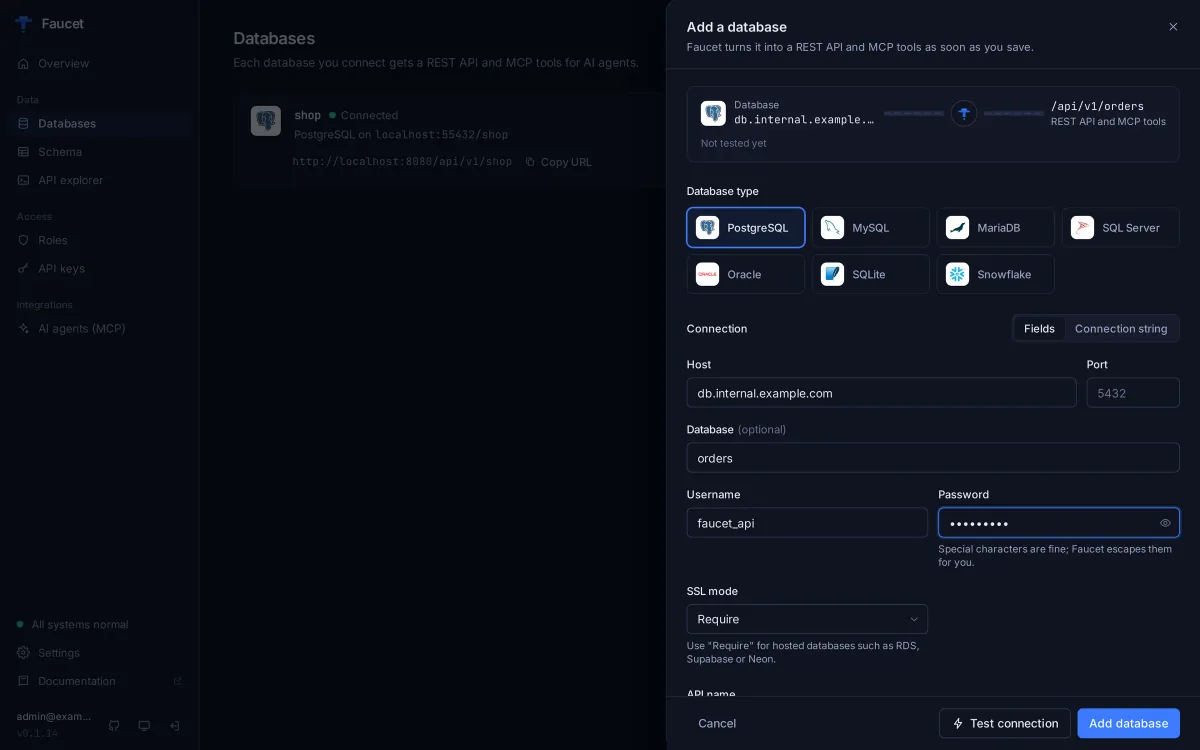
Connect
Open
localhost:8080, enter host, port, database, username and password (or paste a connection string), click Test connection, then save. CLI:faucet db add --host … -
Use it
REST, OpenAPI and MCP are live at
localhost:8080
- 7 databases
- 8 MCP tools
- 0 runtime dependencies
- MIT license
For AI agents
Give Claude, ChatGPT and Cursor safe access to your database
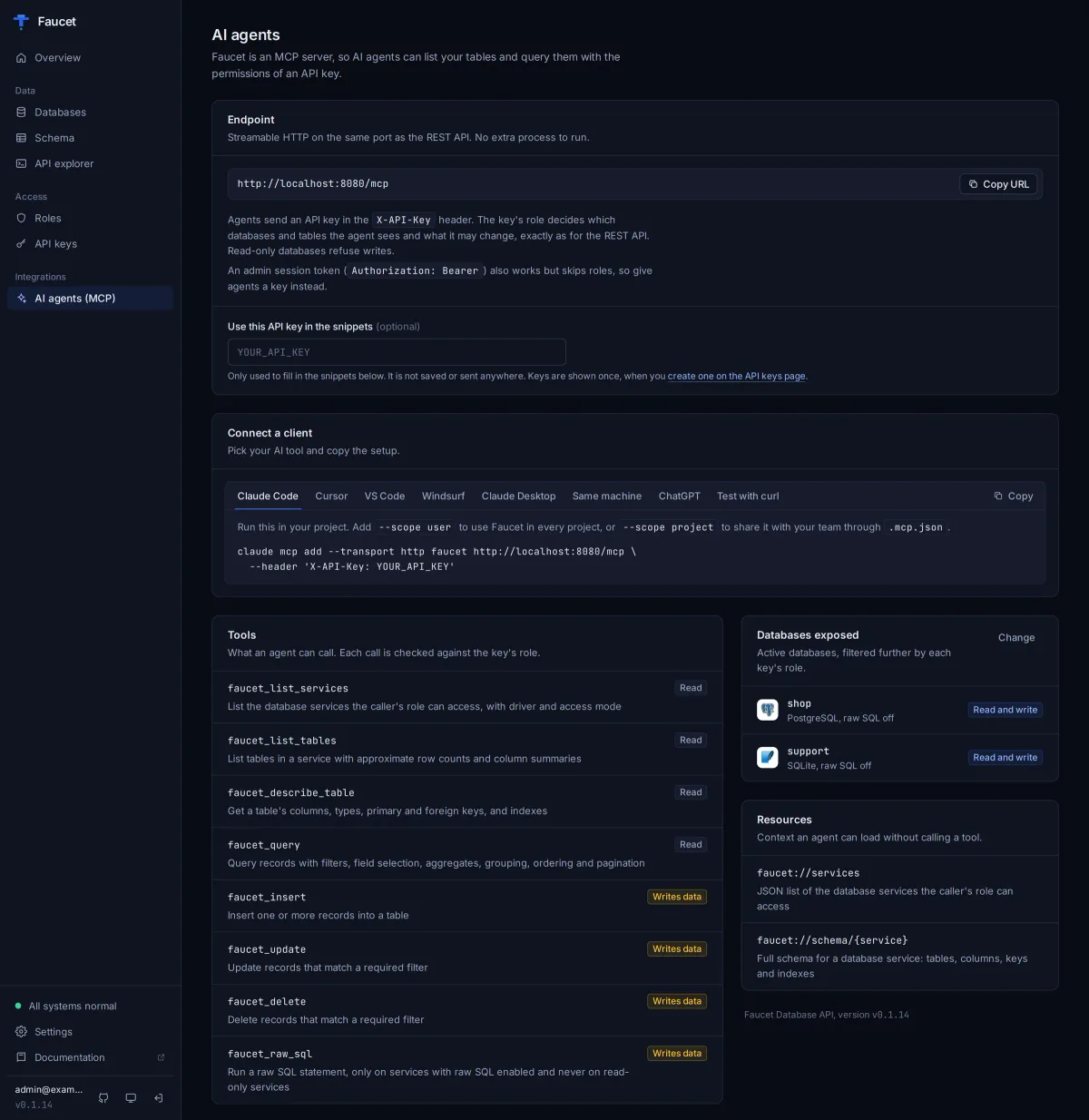
Faucet ships an MCP server at /mcp on the same port as the REST API. Agents connect with an API key, and every tool call goes through the same roles as your REST API.
Claude Code
claude mcp add --transport http faucet http://localhost:8080/mcp \
  --header "X-API-Key: faucet_YOUR_KEY"
Streamable HTTP on the main server. The key’s role decides what the agent can see and do. Add --scope user to use it in every project.
Claude Desktop
{
  "mcpServers": {
    "faucet": {
      "command": "npx",
      "args": [
        "-y",
        "mcp-remote",
        "http://localhost:8080/mcp",
        "--header",
        "X-API-Key:faucet_YOUR_KEY"
      ]
    }
  }
}
Claude Desktop only launches local commands, so the mcp-remote bridge (needs Node.js) forwards requests with your API key. Edit ~/Library/Application Support/Claude/claude_desktop_config.json (macOS) or %APPDATA%\Claude\claude_desktop_config.json (Windows), then restart Claude Desktop. For a remote server over plain http://, add "--allow-http".
Cursor
{
  "mcpServers": {
    "faucet": {
      "url": "http://localhost:8080/mcp",
      "headers": {
        "X-API-Key": "faucet_YOUR_KEY"
      }
    }
  }
}
Save as ~/.cursor/mcp.json (all projects) or .cursor/mcp.json (one project).
VS Code
{
  "servers": {
    "faucet": {
      "type": "http",
      "url": "http://localhost:8080/mcp",
      "headers": {
        "X-API-Key": "faucet_YOUR_KEY"
      }
    }
  }
}
Save as .vscode/mcp.json in your workspace, then use the tools from GitHub Copilot Chat in agent mode.
Windsurf
{
  "mcpServers": {
    "faucet": {
      "serverUrl": "http://localhost:8080/mcp",
      "headers": {
        "X-API-Key": "faucet_YOUR_KEY"
      }
    }
  }
}
Save as ~/.codeium/windsurf/mcp_config.json, then refresh the MCP servers list in Cascade.
ChatGPT
{
  "type": "mcp",
  "server_label": "faucet",
  "server_url": "https://your-host/mcp",
  "headers": {
    "X-API-Key": "faucet_YOUR_KEY"
  },
  "require_approval": "never"
}
For the OpenAI Responses API, pass this in the tools array. In ChatGPT itself, create a Custom GPT Action that imports https://your-host/openapi.json with API-key auth (header X-API-Key). ChatGPT connectors need OAuth, which Faucet doesn’t offer yet. OpenAI calls Faucet from its own servers, so it must be reachable from the internet.
Same machine (stdio)
{
  "mcpServers": {
    "faucet": {
      "command": "faucet",
      "args": [
        "mcp"
      ]
    }
  }
}
Stdio runs with full admin rights and ignores roles, so use it only on your own machine. The client starts faucet mcp itself; the binary must be installed where the agent runs. For Claude Code: claude mcp add faucet -- faucet mcp.
8 tools, one fixed toolset
faucet_list_servicesList connected databasesfaucet_list_tablesList tables in a databasefaucet_describe_tableColumns, types and keysfaucet_queryFiltered, paginated readsfaucet_insertInsert rowsfaucet_updateUpdate rows (filter required)faucet_deleteDelete rows (filter required)faucet_raw_sqlRaw SQL, off unless explicitly granted
Read tools are marked readOnlyHint: true and write tools readOnlyHint: false, so clients can ask before a write. faucet_raw_sql runs only when the service allows raw SQL and is not read-only, and the key's role grants all five verbs on _sql. MCP docs → · AI agents page →
Works with your AI tools
-
Claude Code
MCPclaude mcp add --transport httpwith the/mcpURL and anX-API-Keyheader. -
Claude Desktop
MCPThe
mcp-remotebridge forwards to/mcpwith your API key, so the key’s role applies. -
Cursor
MCPAdd the
/mcpURL and anX-API-Keyheader to.cursor/mcp.json. -
VS Code (GitHub Copilot)
MCPAdd an
httpserver to.vscode/mcp.jsonand use it from Copilot Chat in agent mode. -
Windsurf
MCPAdd
serverUrland anX-API-Keyheader tomcp_config.json. -
ChatGPT
OpenAPI · MCPA Custom GPT Action from
https://your-host/openapi.json, or the MCP tool in the OpenAI Responses API. -
Base44
MCP · RESTAdd
https://your-host/mcpwith anX-API-Keyheader as a custom MCP server, or call the REST API from your app. -
Replit
MCP · RESTAdd Faucet as an MCP server (URL +
X-API-Keyheader) or call/api/v1from your Repl. -
Custom apps
REST · OpenAPIPlain REST + OpenAPI 3.1. Generate a typed client in any language.
Database on-prem? Run Faucet next to it and expose only Faucet over HTTPS (reverse proxy, Cloudflare Tunnel, ngrok). Give agents a read-only role.
Step-by-step guides: Connect Claude to a database · Connect ChatGPT to a database
‘Works with’ means it connects through MCP or REST/OpenAPI. Faucet is independent and not affiliated with or endorsed by these companies.
Features
Batteries included, nothing to babysit
-
RBAC
Roles grant GET/POST/PUT/PATCH/DELETE per service and table. API keys bind to roles; anything not granted is denied.
-
Native MCP server
8
faucet_*tools at/mcp, scoped by API key. Plug it into Claude, Cursor, VS Code, Windsurf or any MCP client. -
OpenAPI 3.1
Generated from your live schema at
/openapi.json. Feed it to client generators, Postman or a Custom GPT. -
Admin UI
Connect any of the 7 databases with plain fields and Test connection (with plain-language error hints), browse schemas and data, try requests in the API explorer and copy them as curl, JS or Python, manage roles and keys, and copy MCP configs from the AI agents page. Admin UI guide →
-
Safe defaults for agents
Read-only services, updates and deletes require a filter, raw SQL off unless granted, schema locking catches drift.
-
Zero dependencies
One static Go binary for Linux, macOS and Windows. Config lives in embedded SQLite.
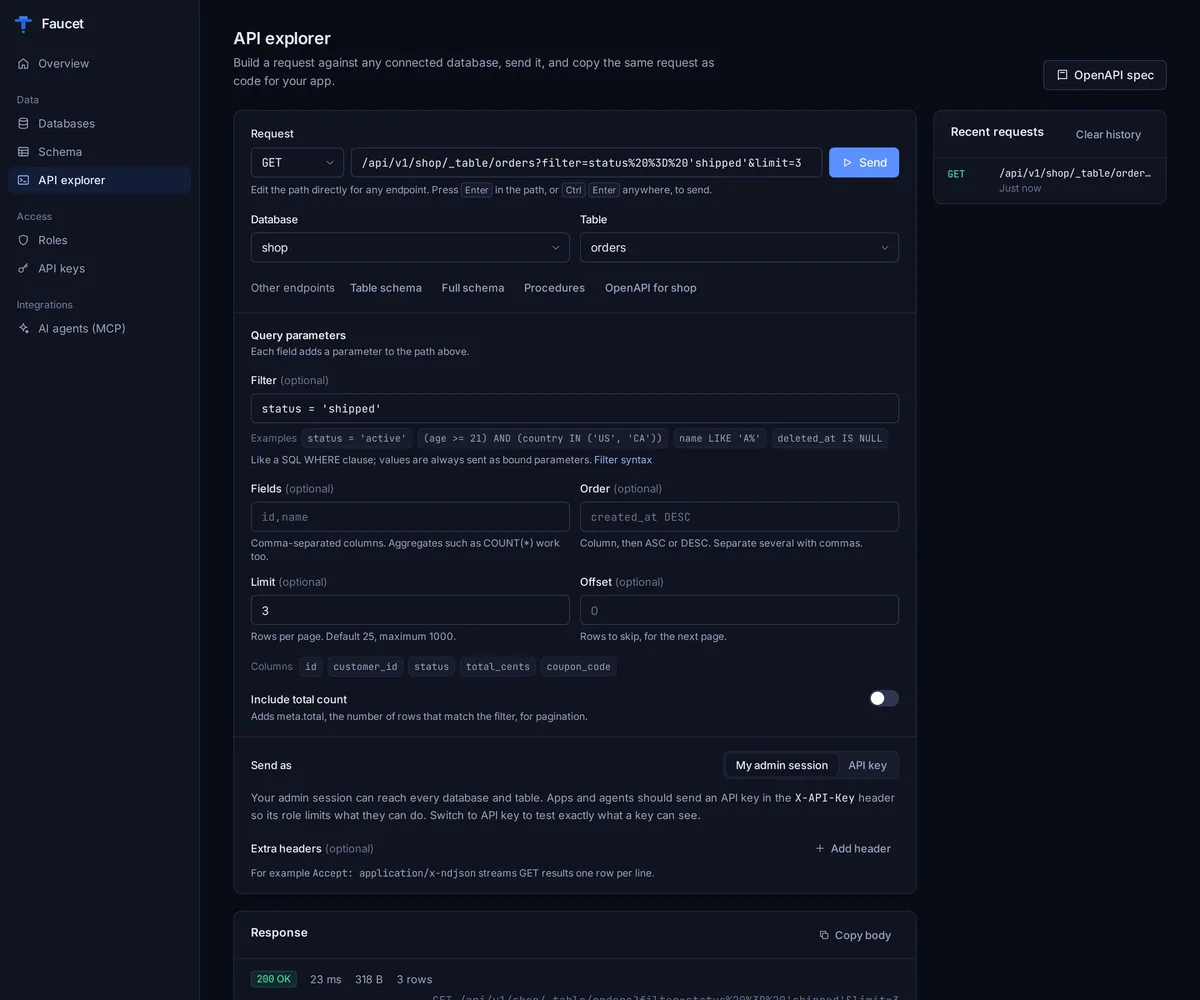
Also in the box: batch operations, stored procedures, DDL via _schema, NDJSON streaming, connection pooling and DreamFactory-compatible filters. Benchmark your own setup with faucet benchmark --driver postgres --dsn …
Use cases
What people build with Faucet
-
Give your AI agent a database
Hand Claude, Cursor or your own agent a read-only key. It can list tables, read schemas and query data over MCP, and nothing else.
MCP -
Backend for AI app builders
Base44, Replit, Lovable and friends speak REST. Give them your
OpenAPI/openapi.jsonURL and a scoped key, and your real data shows up in the app. -
Unlock that on-prem SQL Server
That database behind the firewall? Run Faucet next to it and get a modern REST API without touching the schema or moving the data.
Legacy DB -
Ship an MVP this weekend
Design your tables, point Faucet at them, build the frontend. Filtering, pagination, auth and API docs are already done.
REST -
Internal tools & dashboards
Power admin panels, reports and scripts from one API, with a role per tool so each one sees only the tables it needs.
RBAC -
Self-host anywhere
Raspberry Pi to Kubernetes. One static binary for Linux, macOS and Windows on amd64 and arm64, or the Docker image.
Self-hosted
Compare
Faucet vs the usual suspects
Where Faucet fits next to PostgREST, Hasura and DreamFactory.
| Feature | Faucet | PostgREST | Hasura | DreamFactory |
|---|---|---|---|---|
| Databases | 7 (PostgreSQL, MySQL, MariaDB, SQL Server, Oracle, SQLite, Snowflake) | PostgreSQL only | PostgreSQL-first; other databases via Hasura data connectors | Multiple SQL and NoSQL sources |
| Deploy | Single static binary (or Docker) | Single binary | Docker image | PHP/Laravel API platform |
| MCP server | Built in (stdio + Streamable HTTP) | Not built in | Not built in to the v2 engine | Available in recent versions |
| API style | REST + OpenAPI 3.1 | REST + OpenAPI 2.0 | GraphQL-first | REST + OpenAPI |
| Auth / RBAC | API keys + roles (per service, per table, per verb) | JWT + PostgreSQL roles / RLS | JWT or webhook + role permissions | API keys, users and roles |
| License | MIT | MIT | Apache 2.0 (v2 engine) | Apache 2.0 (open-source edition) |
Quick start
From zero to API in four steps
-
Install
npm, Homebrew, Docker, Go or a single download.
-
Connect
Point it at PostgreSQL, MySQL, MariaDB, SQL Server, Oracle, SQLite or Snowflake.
-
Create a key
Make a role (start read-only) and an API key bound to it. Prefer clicking? Run
faucet serveand use the setup wizard atlocalhost:8080. -
Serve & query
Run
faucet serve. REST at/api/v1, OpenAPI at/openapi.json, MCP at/mcp.
npm
# No install needed: npx runs the latest release
# 1. Connect a database (or use the admin UI at localhost:8080)
npx @faucetdb/faucet db add --name mydb --driver postgres \
  --host localhost --user app --password-prompt --database mydb
# 2. Create a read-only role and an API key
npx @faucetdb/faucet role create --name reader --verbs GET
npx @faucetdb/faucet key create --role reader
# 3. Start the server (runs in the background)
npx @faucetdb/faucet serve
# 4. Query it
curl -H "X-API-Key: faucet_YOUR_KEY" \
  "http://localhost:8080/api/v1/mydb/_table/users?limit=10"
Homebrew
# 1. Install
brew install faucetdb/tap/faucet
# 2. Connect a database (or use the admin UI at localhost:8080)
faucet db add --name mydb --driver postgres \
  --host localhost --user app --password-prompt --database mydb
# 3. Create a read-only role and an API key
faucet role create --name reader --verbs GET
faucet key create --role reader
# 4. Start the server (runs in the background)
faucet serve
# 5. Query it
curl -H "X-API-Key: faucet_YOUR_KEY" \
  "http://localhost:8080/api/v1/mydb/_table/users?limit=10"
Docker
# 1. Run Faucet (config persists in the faucet-data volume)
docker run -p 8080:8080 -v faucet-data:/data faucetdb/faucet
# 2. Open http://localhost:8080 to finish setup:
#    create an admin, connect a database, create a role and an API key
# 3. Query it
curl -H "X-API-Key: faucet_YOUR_KEY" \
  "http://localhost:8080/api/v1/mydb/_table/users?limit=10"
Then open http://localhost:8080 to finish setup.
Go
# 1. Install (Go 1.25+)
go install github.com/faucetdb/faucet/cmd/faucet@latest
# 2. Connect a database (or use the admin UI at localhost:8080)
faucet db add --name mydb --driver postgres \
  --host localhost --user app --password-prompt --database mydb
# 3. Create a read-only role and an API key
faucet role create --name reader --verbs GET
faucet key create --role reader
# 4. Start the server (runs in the background)
faucet serve
# 5. Query it
curl -H "X-API-Key: faucet_YOUR_KEY" \
  "http://localhost:8080/api/v1/mydb/_table/users?limit=10"
Binary
# 1. Install the binary (Linux/macOS)
curl -fsSL https://raw.githubusercontent.com/faucetdb/faucet/main/install.sh | sh
# 2. Connect a database (or use the admin UI at localhost:8080)
faucet db add --name mydb --driver postgres \
  --host localhost --user app --password-prompt --database mydb
# 3. Create a read-only role and an API key
faucet role create --name reader --verbs GET
faucet key create --role reader
# 4. Start the server (runs in the background)
faucet serve
# 5. Query it
curl -H "X-API-Key: faucet_YOUR_KEY" \
  "http://localhost:8080/api/v1/mydb/_table/users?limit=10"
Windows and manual downloads: GitHub Releases.
100% free and open source (MIT). Every feature ships in the binary. No account required.
FAQ
Frequently asked questions
What is Faucet?
Faucet is a free, open-source (MIT) single binary that turns your PostgreSQL, MySQL, MariaDB, SQL Server, Oracle, SQLite, or Snowflake database into a REST API and an MCP server in one command, so your apps and AI agents can use your data with API keys and role-based access built in.
Is Faucet free?
Yes. Faucet is MIT-licensed and every feature is in the open-source binary. A hosted Faucet Cloud is planned but not available yet.
Do I need a connection string?
No. In the admin UI you enter host, port, database, username and password (SSL/TLS where it applies), click Test connection, and Faucet builds and escapes the connection string for you. On the CLI, faucet db add takes the same values as --host, --user, --password-prompt and --database. If you already have a DSN, paste it instead.
Which databases and versions does Faucet support?
Seven: PostgreSQL 9.6–17, MySQL 5.7–9.x, MariaDB 10.2–11.x, SQL Server 2012–2022, Oracle 12c–26ai, SQLite 3.35+ and Snowflake. Connect as many as you like to one instance.
What is an MCP server for databases?
A server that exposes your database as tools an AI agent can call over the Model Context Protocol. Faucet ships 8 tools (faucet_list_tables, faucet_describe_table, faucet_query and more) that run under the role and API key you choose.
How do I connect Claude to my database?
Create a read-only API key, then add Faucet’s /mcp endpoint as an MCP server. Claude Code: claude mcp add --transport http faucet http://localhost:8080/mcp --header "X-API-Key: …". Claude Desktop: use the mcp-remote bridge (npx -y mcp-remote http://localhost:8080/mcp --header X-API-Key:…) in claude_desktop_config.json. Either way the key’s role limits what Claude can do. faucet mcp (stdio) is a same-machine shortcut that runs with admin rights and ignores roles.
How do I connect VS Code (GitHub Copilot) or Windsurf?
Both use the /mcp URL with an X-API-Key header, in their own config shape. VS Code: {"servers":{"faucet":{"type":"http","url":"http://localhost:8080/mcp","headers":{"X-API-Key":"…"}}}} in .vscode/mcp.json, then Copilot Chat in agent mode. Windsurf: {"mcpServers":{"faucet":{"serverUrl":"http://localhost:8080/mcp","headers":{"X-API-Key":"…"}}}} in ~/.codeium/windsurf/mcp_config.json. The admin UI’s AI agents page generates these for you.
How do I connect ChatGPT to my Postgres database?
Run Faucet next to Postgres, expose it over HTTPS, create a read-only API key, then add a Custom GPT Action that imports https://your-host/openapi.json with API-key auth (header X-API-Key).
Can I add Faucet as a ChatGPT or claude.ai connector?
Not yet. Those connectors sign in with OAuth, which Faucet doesn’t offer. Use a Custom GPT Action or the OpenAI Responses API’s MCP tool for ChatGPT, and Claude Code or Claude Desktop for Claude.
Can I use Faucet with Base44, Replit or other AI app builders?
Yes. Expose Faucet over HTTPS, create a scoped key, then add https://your-host/mcp with an X-API-Key header as a custom MCP server, or call the REST API and OpenAPI spec from your app.
My database is on-prem. Does that work?
Yes. Faucet runs next to the database. Expose only Faucet over HTTPS (reverse proxy or a tunnel like Cloudflare Tunnel or ngrok); the database never leaves your network.
Is it safe to let an AI agent touch my database?
Give agents a read-only role. Roles are fail-closed, services can be flagged read-only, updates and deletes require a filter, and raw SQL is off unless you grant it.
How is Faucet different from PostgREST or Hasura?
PostgREST is PostgreSQL-only; Hasura is GraphQL-first and PostgreSQL-first. Faucet is REST + MCP across seven databases in one binary.
Does Faucet support GraphQL?
No. Faucet focuses on REST (with OpenAPI 3.1) and MCP.
Turn on your data in 60 seconds
Free, MIT-licensed, no account needed.
npx
npx @faucetdb/faucet servebrew
brew install faucetdb/tap/faucet && faucet servedocker
docker run -p 8080:8080 -v faucet-data:/data faucetdb/faucetscript
curl -fsSL https://raw.githubusercontent.com/faucetdb/faucet/main/install.sh | sh